
With the rise of TikTok as a global entertainment platform, the demand for its diverse content has increased exponentially, making it one of the most popular platforms among users. The same procedure we use to download TikTok videos applies to downloading audio extracted from TikTok videos. In this case, you’ll select the option to download audio in MP3 format. SSSTikTok guarantees original download quality, allowing you to enjoy the audio at the highest quality — making it the easiest way to convert TikTok to MP3.
Here we explain how to use SSSTikTok audio downloader to download audio from TikTok in MP3 format.
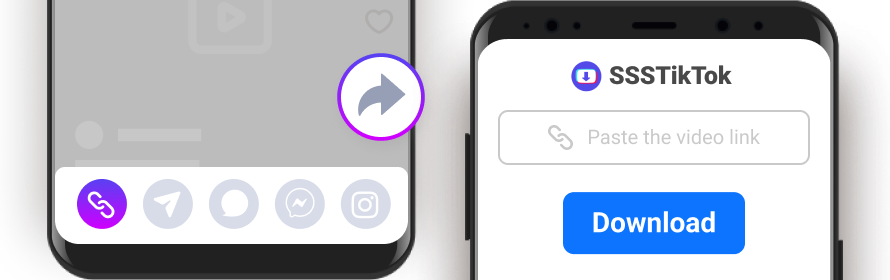
The steps are:
- Open TikTok on your phone or browser. Find the video whose audio you want to save.
- In the lower right corner of the screen, tap the “Share” icon. Select “Copy Link.”
- Open your browser and visit sssstik.com. Click on “Download.”
- In the options that appear, choose “Download MP3.” In less than 5 seconds, the audio will be saved to your device in original quality.
MP3, MP4, or WAV: What’s the Best Format to Download Audio from TikTok?
When you want to download TikTok audio, many users wonder: which format should I choose? Below we explain why MP3 is the best option for TikTok MP3 download.
| Feature | MP3 | MP4 | WAV |
| Type | Audio only | Video + Audio | Audio only |
| File size | Small (~3MB) | Large (~15MB) | Very large (~30MB) |
| Compatibility | Universal | Universal | Limited |
| Quality | High | High | Maximum |
| Ideal for | Listening to music, ringtones, WhatsApp | Watching video | Professional editing |
MP3 is the ideal format when you want to convert TikTok video to MP3, as it offers the perfect balance between audio quality and file size. You can listen offline, use it as a ringtone, or share it easily.
If you want a fast TikTok to MP3 experience, simply paste the link into SSSTikTok and choose MP3 — it’s the easiest way to download audio from TikTok video with original quality.
Why Use SSSTikTok MP3 Downloader?
A comparison of SSSTikTok with other TikTok video and audio download tools:
Why are we the best option for downloading TikTok content? Below, you’ll discover our key advantages in this space.
In a market full of options for TikTok song download, SSSTikTok stands out with a unique combination of features and benefits:
1. High-Quality Downloads in MP3 and MP4
- MP4: Download TikTok videos in the highest quality to watch offline and share with anyone you want. You can even download video TikTok MP3 audio separately from the same link.
- MP3: Extract music from your favorite videos and save it in MP3 format with the best audio quality, so you can listen to your favorite songs anytime, anywhere.
2. Versatility and Full Compatibility
SSSTikTok works on all devices and operating systems: Android, iOS, Harmony OS, Windows, Linux, and macOS. No matter what device you have, you’ll have full access to all features of this MP3 TikTok downloader without any restrictions.
3. Speed, Simplicity, and Completely Free
- Fast: Download TikTok audio and video at ultra-fast speeds and have your favorite content in seconds.
- Simple: The SSSTikTok interface is simple and intuitive. You don’t need any technical knowledge to download your favorite videos and audio.
- Free: SSSTikTok is completely free. You only need an internet connection and access to TikTok to get started.
4. Privacy and Security
SSSTikTok doesn’t require registration, protecting your privacy and allowing you to download audio TikTok content securely.
5. One-Click Convenience
SSSTikTok works directly in your browser. With just one click, you can download whatever you want — no complicated installations needed. It’s the simplest Tik Tok to MP3 converter available online.
6. No Ads and No Limits
With SSSTikTok, you get a clean experience — no pop-ups, no banners, and no interruptions. Plus, you can download as many audio files and videos as you want, with no daily limits. Use it as much as you need, always for free.
FAQs
How do I download audio from TikTok with SSSTikTok?
It’s very simple. Copy the TikTok video link, paste it into the SSSTikTok search box, and click “Download MP3.” In just a few seconds, you’ll be able to download TikTok audio directly to your device.
Do I need to install an app to download audio from TikTok?
No. SSSTikTok is an online tool. Just open your browser and visit our site to download audio from TikTok. However, if you use Android, you can also download our app, which offers even more features and a more convenient daily experience. When you click the download button, we sometimes also offer our app download. It’s entirely up to you whether to install it or not.
Can I download TikTok audio directly from a link?
Yes. Simply copy the video link and paste it into SSSTikTok to download TikTok audio from the link. It works with any public TikTok link.
Can I download TikTok audio for WhatsApp?
Yes. Just paste the video link into SSSTikTok and download the audio in MP3. The file will be saved to your phone, and then you can open WhatsApp and share it with friends or in any group.
Can I save TikTok audio to my phone?
Yes. SSSTikTok lets you save TikTok audio on any device — iPhone, Android, or PC. The file is automatically saved to your downloads folder.
How do I save TikTok audio in high quality?
SSSTikTok preserves the original audio quality when you save TikTok audio. There’s no additional compression, ensuring the best listening experience.
Can I download TikTok audio in bulk?
Not yet. Currently, SSSTikTok can only download TikTok audio one at a time. Paste the link, download the MP3, and repeat the process for other videos.
How do I convert a TikTok video to MP3?
With SSSTikTok, it’s easy to convert TikTok video to MP3. Just paste the video link and select the MP3 option — the audio will be extracted automatically. It works as a TikTok audio converter with just one click.
Is SSSTikTok a free TikTok audio downloader?
Yes. SSSTikTok is a 100% free TikTok audio downloader — no registration, no ads, and no daily limits.
Can I download a song from TikTok without downloading the video?
Yes. SSSTikTok offers a dedicated button to download song from TikTok in MP3 format, without needing to download the entire video.
Discover More: