
TikTok Stories only last 24 hours. After that they get deleted. You can’t save them from the app. There’s no save button, no download button, nothing. If you saw a cool story and forgot to do anything about it, too bad. It’s gone the next day.
A lot of people told us they wanted this. They already use SSSTikTok to download TikTok videos and stuff, and they kept asking us to add Stories too. So we did. In 2026 we added a TikTok story downloader to our site. You paste the TikTok story link, you pick what you want, and you get the file. Simple, right?
TikTok story downloader works for video stories and photo stories. Our SSS TikTok Story downloader just needs the link. You don’t have to install any app. You don’t have to make an account. Just open sssstik.com in your browser on your phone or computer.
What Are TikTok Stories?
You know when you see a blue ring around someone’s profile picture on TikTok? That means they posted a Story. You tap on it and you see a short video or a photo. It stays up for 24 hours. After that, the creator can still find it in their story archive, but everyone else loses access to it. You won’t be able to watch it or save it anymore.
People post different kinds of stuff in Stories. More casual things. Like behind the scenes clips or random photos. Stuff they wouldn’t put on their main page. It feels more real because it’s not edited or polished. A lot of good content shows up in Stories.
The bad part is you can’t keep any of it. TikTok has no way to save TikTok story posts. You see it, and then it’s gone. That’s why people look for a TikTok stories downloader. With SSSTikTok, stories are easy to save. Just grab the link before the 24 hours are up and paste it on our site.
How to Download TikTok Stories with SSSTikTok
Same steps as downloading a normal TikTok video. It takes about 30 seconds.
On Your Phone (Android / iOS)
- Open the TikTok app. Go to the Story you want.
- Tap Share on the right side. Then tap Copy Link.
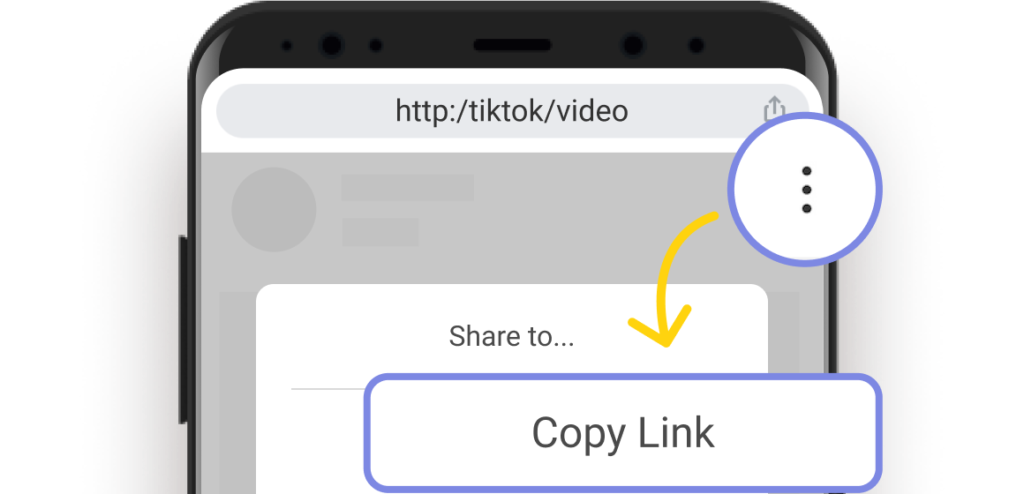
- Open your browser. Go to sssstik.com.
- Paste the link. Tap Download.
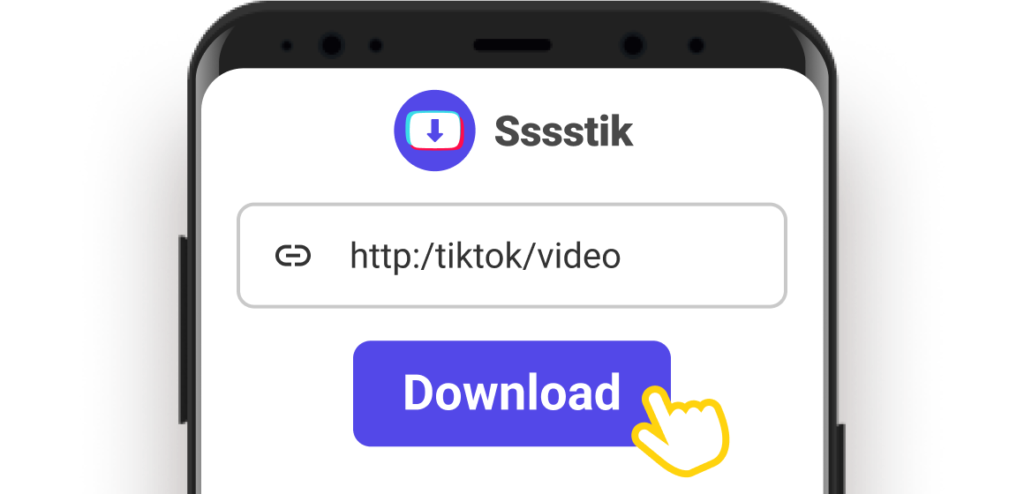
- Pick MP4 for the video, MP3 for just the sound, or the profile picture.

Done. Check your gallery or downloads.
On Your PC (Windows / Mac)
- Open tiktok.com in your browser. Find the Story.
- Click the address bar at the top. Copy the URL.
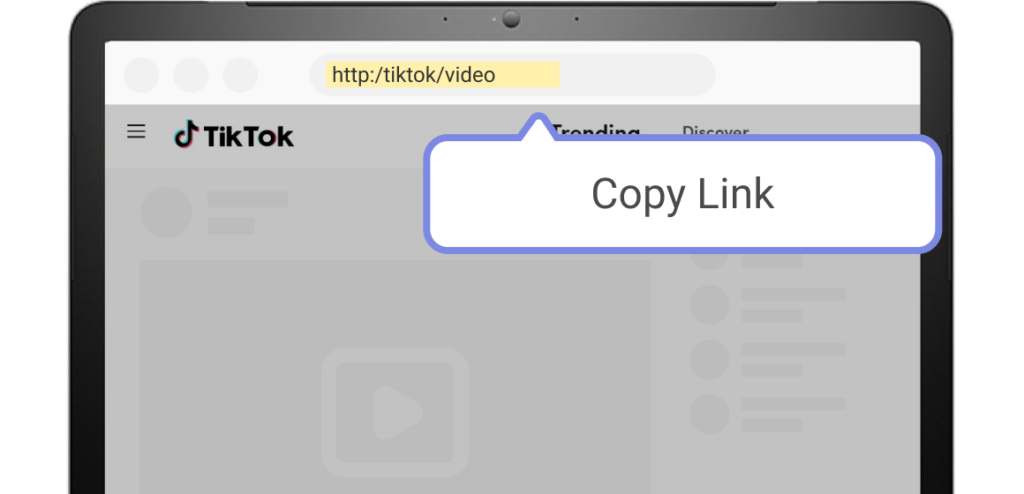
- Open a new tab. Go to sssstik.com.
- Paste the URL. Click Download.
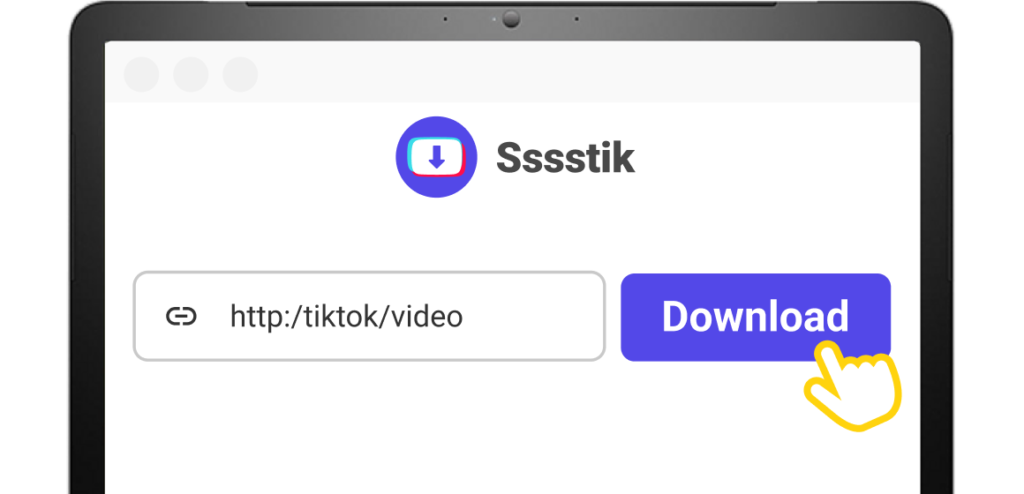
- Pick MP4, MP3, or profile picture. The file goes to your downloads folder.

That’s all you have to do. No sign-up. No app to download. SSSTikTok works as a TikTok story video downloader and photo downloader at the same time. You can download TikTok stories no matter what type they are.
Why Use SSSTikTok to Download TikTok Stories?
Lots of TikTok downloaders exist online. But most of them don’t work well with Stories. You try to download story from TikTok and you get an error or the file looks bad. Some sites are also full of weird ads and pop-ups.
SSSTikTok is better for this. Here’s why.
We get the real file from TikTok. Not a screen recording, not a low quality copy. The actual file. So the video looks the same as it did in the app. Photos come out clean too. If you want to download story TikTok HD content, this is the way to do it. You can also grab just the audio from a video story as MP3. Our SSS TikTok Story downloader gives you all these options on one page.
And it’s free. Not “free for 3 downloads then pay us” free. Just free. No limits. No daily cap. You can use it as much as you want. Oh and there are no ads on the page either. No pop-ups, no banners, no video ads that play out of nowhere. Just a clean page with a download bar.
You also don’t need to give us any info. No email. No TikTok password. We don’t ask for any of that. And it works on any device. Phone, laptop, tablet, old computer, whatever. Android, iPhone, Windows, Mac, all good. SSSTikTok stories page works on all of them.
Most downloads are done in a few seconds too. Stories are usually short so the files are small. You won’t be waiting around.
SSS TikTok Story Downloader vs. TikTok’s Own Save
| Feature | SSSTikTok | TikTok Save |
| Works on Stories | ✅ Yes | ✅ Yes |
| HD quality | ✅ Yes | ⚠️ Lower |
| Audio only (MP3) | ✅ Yes | ❌ No |
| Works in browser | ✅ Yes | ❌ Need the app |
| Free | ✅ Yes | ✅ Yes |
| Login | ❌ No | ✅ Yes |
TikTok lets you save story videos, but the quality is lower and there’s no audio option. If you want the full HD file or the MP3 version, SSSTikTok is the better choice. Whenever you need to download story TikTok clips in original quality, our site has you covered.
Frequently Asked Questions
Can I only download stories that are still up?
Yes. Once a story is deleted after 24 hours, there’s nothing to download anymore. So if you see something you like, get the link right away. Don’t wait. The whole SSSTikTok story download process takes a few seconds so there’s no reason to put it off.
What about private accounts?
No. If the account is private, you can’t get to their stories. No tik tok story saver can do that. Only public stories work.
Is there a limit to download TikTok stories?
No limit at all. Download one story or download fifty. We don’t care. SSSTikTok stories download page is open for you to use as much as you need.
What stories file do I get?
All stories save as MP4 since TikTok converts everything to video format, even photo stories. You can also get MP3 if you just want the sound.
Is it safe to use SSSTikTok?
Yes. We don’t ask for your TikTok login. We don’t save your links. The file you get is just the video or audio. Nothing else. You can download story TikTok HD files without any worry.
⚠️ One More Thing
Saving stories to watch later or keep for yourself? Go ahead. But if you’re thinking about reposting someone else’s stuff or using it for your own business, just ask the creator first. It’s their content. Don’t be that person who takes other people’s work and acts like it’s theirs. SSSTikTok makes downloading easy, but what you do with the file after that is on you.
In Conclusion
TikTok Stories only stay up for one day, and the app’s own save gives you a lower quality file with no audio option. If you want to keep a story in full HD, our SSSTikTok Story downloader is the easiest way.
Paste the link on sssstik.com and make a fast TikTok story download. That’s the whole thing.
Discover Others: